News - 07-08-2026
AR Viewer is now available!
Hansen Products AR Viewer – Augmented Reality in Your Space Discover the innovative AR tool from Hansen Polska that allows you to display aluminum door systems and sample corners in true 1:1 scale directly within your own environment. Total Convenience: Works directly in your phone's browser – no need to install any extra applications. 3D Precision: Examine fine details closely, rotate models, and virtually test products in their target location. Always at Hand: Easily save the tool as a shortcut on your phone's home screen (for both iOS and Android) for instant access anytime.
Hansen Products AR viewer is a convenient tool that allows you to view Hansen Products structures in your space using AR technology on your phone or tablet.
To access the AR tool, scan the QR code above or click the link:
https://hansen.synaptixcore.eu/

Before use, we recommend reading a short guide which will make usage easier and more convenient. The short guide also gives you the option to pin the app to your phone’s home screen, keeping it always at hand.Short movie on youtube about using this tool
Why use our AR tool?
- Convenience – Details and profile appearance always at hand. Almost like a physical element.
- Detail precision: See the quality of our aluminum profiles up close by rotating the model in 3D technology.
- Virtual try-on: Check how the chosen structure looks in its target location or compared to another system.
- Accessibility: The tool works directly in your phone's browser – no need to install any additional applications.
How to use the tool?
- Use your phone, tablet, or iPad. Full functionality is available on devices equipped with an integrated camera.
- Select model: Go to the model list and click the product you want to check.
- Open preview: The system will take you to the interactive 3D view.
- Enable AR function: Click the "View in AR" (augmented reality) icon to bring the model into the real world.
- Grant permission for the application to access your camera.
- Adjust: Point your phone's camera at the floor or wall. The device will automatically place the model onto the real image. Lighting plays an important role. If there are display issues, you need to change the lighting. If the bottom of the structure seems to "sink" into the floor, lift it up with one finger.
- View: To comfortably examine the presented object, it is best to bring the phone closer by walking up to it. Treat your phone as an extra eye that can be moved closer and placed anywhere. Additionally, you can rotate and move the model on the phone screen. We recommend scaling the model to 100%, which allows for a realistic 1:1 comparison with other elements in the environment.

How to add the AR tool to your home screen?
With this solution, our app will always be at hand – just one tap to check models in AR.
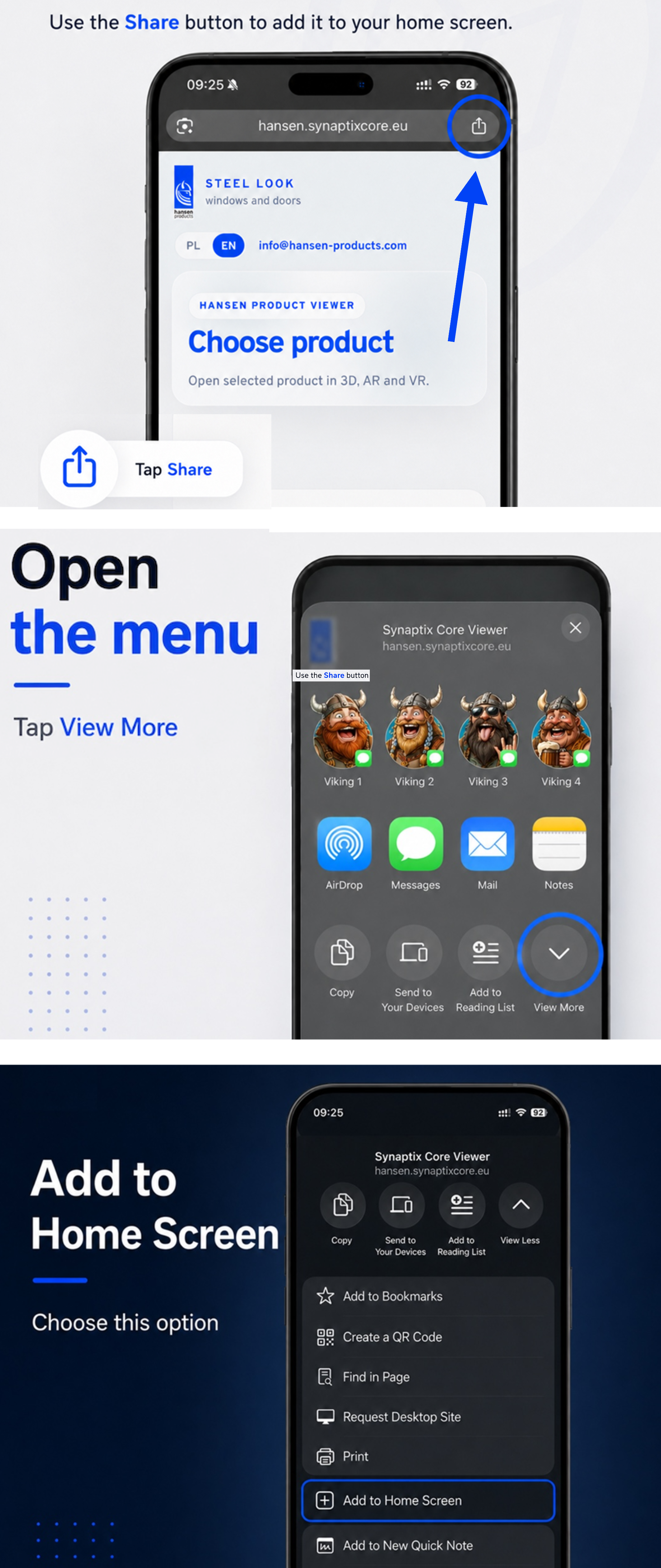
For Apple devices (iPhone/iPad):
- If you opened the page in the Google search app, use the Share option, then open the page in your available browser (Safari, Chrome, or other).
- In the browser (Safari, Chrome, or other), click the Share icon (the square with an arrow pointing up at the bottom of the screen).
- Scroll through the menu, click "View More", and then select "Add to Home Screen".
Confirm by clicking "Add". The icon will appear on your desktop.
For Android devices:
- Open our website in the Chrome browser.
- Click the three dots in the top right corner of the screen.
- Select "Install and create shortcut ".
- Confirm your choice. A shortcut with our logo will appear among your applications.